
Author: cfxadmin
What B2B Buyers Look for Before Getting in Touch

Today, most B2B buyers are already informed before they speak to a sales rep. In fact, research shows that 92% of B2B decision-makers search online first. That means your potential customer is forming opinions about your company before you even know they exist.
The question is: what are they seeing?
The Self-Directed Buying Journey
The B2B buying process has shifted. Buyers now take themselves through the first stages of the journey:
- They search online for solutions
- They check out websites, reviews, and competitor comparisons
- They look up company LinkedIn pages and employee profiles
- They browse blog content, FAQs, and case studies
By the time they contact you, they’ve already narrowed down their list.
If your digital presence is outdated or inconsistent, you may not even make the shortlist.
Key Moments That Influence Trust
Buyers are not just looking for a supplier. They want a company they can trust. Here are the moments that shape that perception:
Your website
This is often the first stop. It should clearly explain what you offer, who you help, and how to get in touch. Make sure the site loads quickly, works on mobile, and doesn’t feel out of date.
Search results
People Google your company name. If the top links show inactive pages or poor reviews, that hurts your credibility. Aim to own your first-page search results with up-to-date content, active profiles, and relevant listings.
LinkedIn presence
Buyers will look at your company page, your leadership team, and your sales reps. Incomplete or inactive profiles raise red flags. A clear, consistent message across your team builds confidence.
Customer reviews and testimonials
Even in B2B, people look for social proof. They want to see how others rate your service. Encourage happy clients to leave reviews on Google or industry-specific platforms.
Content and thought leadership
Blog posts, white papers, and case studies show you understand your industry. This kind of content helps buyers feel informed and supported. It also improves your visibility in search.
What Buyers Want to Know
When researching suppliers, most buyers are trying to answer a few core questions:
- Can this company solve my problem?
- Do they understand my industry?
- Are they easy to work with?
- Can I trust them with my business?
Your digital presence should address these questions. This includes clear service descriptions, named contact points, proof of results, and up-to-date team profiles.
How to Improve Your Digital Storefront
Start with a simple audit. Google your own company. What comes up? Ask yourself:
- Is our website current and helpful?
- Do our LinkedIn profiles reflect our roles and expertise?
- Are we publishing content that shows we know our field?
- Can prospects find reviews or client feedback?
Small improvements can have a big impact:
- Update your homepage and About page with clear, concise language
- Add fresh content that answers real buyer questions
- Share recent wins or client successes on LinkedIn
- Ask a client to write a short testimonial
The Buying Process Starts Before You Speak
Your website and online presence are not just supporting your sales process. They are part of it. In many cases, they are the first and most important step.
You don’t get a second chance to make a first impression.
Make sure that when someone Googles your company, what they find reflects your real strengths and not a version of your business from five years ago.
True or False: The Best Logistics Companies Don’t Need Marketing

There is a common belief among many logistics providers that excellent service alone is enough to sustain and grow a business. The assumption is that if deliveries are punctual, operations are efficient, and prices remain competitive, customers will continue to return. While this has held true in certain circumstances, it is no longer a guarantee of continued success.
The reality is that the market has shifted. When key sales personnel leave a company, when economic conditions change, or when a large player like Amazon enters a niche market, logistics providers can suddenly find themselves exposed. In these situations, companies that have not built brand recognition or invested in marketing are often the most vulnerable.
Insights from Industry Research
A study conducted with over 100 logistics service providers (LSPs) revealed several notable trends regarding marketing within the sector. The majority of respondents indicated that marketing activities are primarily considered as tools to support sales efforts. Almost half of the companies surveyed do not maintain a dedicated marketing department. Instead, marketing responsibilities often fall to sales teams or operational staff. Furthermore, budgets allocated for marketing are minimal, typically accounting for just one to two percent of total company expenditure.
The research also indicated that regular market research is not a common practice. Only around 38 percent of the companies reported engaging in systematic market analysis. Most firms do not use marketing as a strategic function to shape customer relationships or influence long-term business direction.
Why Marketing is Becoming a Priority
Despite this historical undervaluation, there is a growing recognition that marketing has an important role to play in logistics. As services offered by different companies become increasingly similar, the ability to differentiate on the basis of speed, reliability, or price alone is diminishing. Companies are beginning to understand that marketing provides a mechanism to build recognition, trust, and preference in the minds of customers.
Marketing is not simply about promotion. It is a way to communicate value, support the sales process, and maintain ongoing engagement with clients. For logistics companies, a focused marketing approach can achieve several objectives: building a consistent brand, clarifying the company’s value proposition, staying visible in competitive markets, generating new leads, and collecting insights into customer needs and preferences.
What Digital Marketing Looks Like for Logistics Providers
Digital marketing offers a cost-effective way for logistics firms to engage with potential and existing customers. It does not require large teams or extensive budgets to be effective. Instead, a targeted and consistent approach is more important.
A well-structured website is a basic starting point. It should clearly explain the services offered, the types of clients served, and the reasons to choose the company. Including case studies, testimonials, and straightforward contact options enhances trust and credibility.
Search engine visibility is essential. If a company is not easily found on platforms like Google, it misses out on potential business. Creating helpful content that addresses common customer queries and using local SEO techniques can improve online presence.
Email marketing remains a valuable channel for staying connected with customers. Sharing relevant updates, industry insights, or service changes can help maintain engagement and demonstrate thought leadership.
Social media, particularly platforms like LinkedIn, offers a space to share company news, client successes, and industry commentary. These posts should aim to educate and inform rather than overtly sell services.
Content marketing, such as writing blog posts or producing whitepapers, allows logistics companies to showcase their expertise and provide valuable information to their audience. Topics might include explanations of complex logistics processes, industry trends, or tips for improving supply chain efficiency.
Targeted advertising on platforms like Google Ads or LinkedIn can help drive traffic and generate leads. Starting with small campaigns and adjusting based on performance can keep costs manageable and improve results over time.
Measuring Results
It is not necessary to track every available metric. A few key indicators can provide useful insight into the effectiveness of marketing efforts. These may include website traffic, form submissions or contact enquiries, open and click-through rates on emails, engagement with social media posts, and conversions from advertising campaigns.
Monitoring these metrics on a monthly basis allows companies to identify what is working, make informed adjustments, and discontinue activities that do not deliver value.
Addressing Common Barriers
Many logistics providers cite lack of time, uncertainty about what to communicate, or previous disappointing results as reasons for avoiding marketing. These challenges are common, but they can be addressed through a focused and disciplined approach.
Starting with one or two marketing channels, committing to regular updates, using clear and jargon-free language, and prioritising helpful over promotional content are all achievable steps. There is no requirement for high-end video production or viral social campaigns. What matters most is being visible, consistent, and customer-focused.
Questions to Consider
Business leaders should ask themselves several important questions:
- If a major client stopped working with the company, how would that revenue be replaced?
- If a competitor introduced a similar service offering, how would the company maintain its market share?
- If the current sales pipeline dried up, where would new business come from?
If these questions are difficult to answer, it suggests a need for a stronger marketing function. Marketing provides a way to reduce reliance on individual salespeople, react more effectively to market changes, and maintain a steady flow of opportunities.
The logistics companies that are most likely to thrive in the future will be those that invest in building clear, recognisable brands and maintain active communication with their target audiences. Marketing is not a temporary tactic or a luxury. It is a strategic function that supports growth, resilience, and long-term success.
Is Your WordPress Site Driving You Nuts? Here’s How to Fix It

You know that feeling when your WordPress site just won’t cooperate? Maybe it’s running painfully slow, throwing up random errors, or worse—completely crashing at the worst possible moment. It’s frustrating, right? But here’s the good news: most WordPress issues have solutions, and they’re often easier (and cheaper) to fix than you’d think.
In this post, we’ll go over the common problems business owners face with their WordPress sites and how to fix them—without tearing your hair out.
1. Slow Website? Here’s What’s Slowing You Down
A sluggish website isn’t just annoying—it’s bad for business. Visitors won’t wait around for pages to load, and Google certainly won’t rank you well if your site crawls like a snail.
Common culprits:
- Bloated themes with too many bells and whistles
- Unoptimized images that take forever to load
- Too many plugins running in the background
- Poor-quality web hosting
The fix:
Start by running a speed test with Google PageSpeed Insights or GTmetrix. Then:
✅ Compress images using tools like TinyPNG or Smush
✅ Remove unused plugins and themes
✅ Enable caching with a plugin like WP Rocket
✅ Upgrade your hosting if your site’s getting too much traffic for a budget plan
2. Error Messages You Don’t Understand (But Need to Fix)
Ever seen the dreaded “There has been a critical error on this website” message? It’s vague, unhelpful, and completely terrifying if you’re not a developer.
Other common issues include:
- The White Screen of Death (WSOD) – where your site just… disappears
- Internal Server Errors (500 errors) – usually caused by plugin conflicts
- Database Connection Errors – when your site can’t talk to its database
The fix:
- First, don’t panic. Most errors happen because of plugin conflicts or a misconfigured update.
- Disable plugins one by one. If you can still access your dashboard, deactivate them all, then reactivate them one at a time.
- Switch to a default theme. If your site works again, your theme might be the issue.
- Check your error logs. Many hosting providers let you access logs that show what went wrong.
If you’re stuck, reach out to a WordPress expert—sometimes, a five-minute fix can save you hours of frustration.
3. Your Site Got Hacked – Now What?
Security is a big deal, especially if your site collects customer data. If your site has been hacked, you might notice:
❌ Strange pop-ups or redirects
❌ New admin users you didn’t create
❌ Google flagging your site as “unsafe”
The fix:
- Change all passwords immediately (including hosting and database access).
- Scan for malware using security plugins like Wordfence or Sucuri.
- Restore a clean backup (if you have one).
- Update everything. Most hacks happen because of outdated plugins or themes.
To prevent future attacks, install a firewall and enable two-factor authentication for logins.
4. Contact Forms or Emails Not Working?
If customers are trying to reach you and you’re not getting their messages, your contact form could be broken. This happens a lot with WordPress contact forms because some hosting providers block certain email functions.
The fix:
- Use an SMTP plugin (like WP Mail SMTP) to ensure emails get delivered properly.
- Test your form by sending yourself a message.
- Check spam folders—sometimes, emails end up there instead.
5. Plugins That Break Everything
WordPress plugins are great—until one of them breaks your entire site. Ever updated a plugin, only to find your website suddenly unresponsive?
The fix:
1️⃣ Disable all plugins. If your site comes back, one of them is the culprit.
2️⃣ Reactivate plugins one at a time to see which one causes the problem.
3️⃣ If an update broke your site, roll it back to a previous version using a plugin like WP Rollback.
And here’s a golden rule: don’t install every plugin you find. Stick to well-reviewed plugins that are actively maintained.
Final Thoughts
Running a WordPress site doesn’t have to be a headache. Most problems—whether it’s slow speed, error messages, security issues, or broken plugins—can be fixed with a little troubleshooting.
If you’re dealing with a stubborn issue and need help, don’t waste hours searching forums—get in touch with a WordPress expert who can fix it quickly. Sometimes, a small tweak can make a world of difference.
Cocoonfxmedia Ltd Recognised with Fair Payment Code Gold Award for Ethical Business Practices

Cocoonfxmedia Ltd, a multi-award-winning digital marketing agency, has been awarded the prestigious Fair Payment Code (FPC) Gold Award. This accolade is given to companies that pay at least 95% of all invoices within 30 days and adhere to the principles of fairness, transparency, and collaboration with their suppliers.
Cocoonfxmedia Ltd has long been a champion of fair payment practices, consistently ensuring that its suppliers are paid within 30 days or sooner. Co-founder James Blackman has been actively advocating for better payment practices for over a decade, making fair supplier payments a key focus during his tenure as President of the Lichfield & Tamworth Chamber of Commerce.
“I have been working closely with the last three Small Business Commissioners to help level the playing field for micro-businesses. Ensuring timely payments is crucial for small businesses’ survival, and I have provided ongoing feedback to Liz Barclay, the current Small Business Commissioner, regarding the challenges small enterprises face in receiving payments on time,” said James Blackman, Co-founder of Cocoonfxmedia Ltd. “Receiving the FPC Gold Award is a testament to our ethical approach to business and our commitment to supporting a fairer business environment.”
About Cocoonfxmedia Ltd
Cocoonfxmedia Ltd is a multi-award-winning digital marketing agency based in Lichfield, UK. The company specialises in effective design solutions and digital marketing strategies that align with clients’ organisational goals while maintaining best business practices and environmental considerations.
Since 2020, Cocoonfxmedia Ltd has been a carbon-neutral company, further demonstrating its dedication to ethical and sustainable business operations.
For more details about the Fair Payment Code, visit: https://www.fpb.org/fair-payment-code
E-E-A-T’s impact in SEO

E-E-A-T is an acronym for experience, expertise, authority and trustworthiness in regards to Google’s page ranking algorithms. When you hit all the points perfectly, you’ll rank higher in search engine results pages (SERPs).
Many experts claim people never look past the first page of search results. Ensuring you rank as high as possible increases traffic and improves your chances for online growth. Knowing what E-E-A-T is and how to implement increases the chances you’ll gain significant SEO with just a little effort.
Google offers Search Quality Rater Guidelines for its third-party raters. They work with over 16,000 people to get feedback on various websites and how well they match user intent and offer excellent user experience (UX). However, businesses can tap into the recommendations to figure out ways to rank higher than the competition.
To better understand how to improve your search engine optimization (SEO), it’s crucial to understand how Google looks at E-E-A-T. Let’s define each element to fully understand just what Google looks for. We’ll also offer suggestions to improve each area for the best chance at better SERP results.
1. Experience
One of the factors Google considers is whether the person writing content for a website has experience in the area. Someone who has been in the field is much more likely to better understand terms and jargon of the industry. They’ll know first-hand what works and what doesn’t.
The problem brands sometimes face is learning how to translate that experience part of E-E-A-T into readable content. People can be quite knowledgeable but not able to break things down in a way that makes sense to a beginner.
The best writers have both experience and an understanding of the audience. To improve your content and meet this expectation from Google, try these tips:
- Know the topic better than the average person.
- Study the audience to understand their level of expertise and what language you should use.
- Define any industry jargon so anyone can understand the content. What terms aren’t known to outsiders? It’s okay to throw them in to show your experience but make sure you explain them and don’t overdo it.
- Look for topics or angles others haven’t covered. How can you present something useful but unique?
With a bit of effort, you’ll showcase the experience behind your brand without confusing people new to the industry.
2. Expertise
The difference between expertise and experience is often subtle, even by Google’s definitions. The person who is an expert likely also has experience in the field or with the topic. For example, a chef reviewing a local restaurant has expertise in the industry. However, if he hasn’t dined at local restaurants or that restaurant, he has no experience to base his article on. The best content merges both of the Es in E-E-A-T.
Knowing how buyers respond to content and promotions can also drive what websites publish. For example, the average retailer offers a sale of around 20 to 25% off several times a year and expects to see a sales boost around 20% during the promotion.
When content is centered around what the user wants, what the business knows and experiences, the numbers may be even higher. Google will also rank the content so it gets more eyes on it, drawing even more customers to the site.
3. Authority
Sites with authority are typically more established and have developed a brand reputation. For example, when you think of companies such as:
- Amazon
- Target
- John Lewis
Why do these sites rank so high in SERPs? You might have better content, more knowledgeable experts and a consistent keyword strategy and will still get outranked by big names.
Authority measures how established a site is, the amount of content, how well it meets user intent and if people trust the company. There are some things you can do to increase your authority, but there isn’t a fast approach to building up this aspect of your SEO strategy. You must put in consistent effort before you’ll be seen as the go-to on a topic.
You want a site that functions as it should, so avoid problem areas. For example, infinite scrolling can result in lower SEO and site speed can impact results.
Some things you can do is write articles for blogs and other sites and ask for a link back to yours. You only want to utilize high quality sites for this as the quality of the sites linking to yours matters. You should give talks, host webinars and consistently post on your own site. Even the age of your site impacts authority, so consider buying an established domain, too.
4. Trustworthiness
The final letter in the acronym stands for trustworthiness. The final consideration is the thing creators have the most control over. The search engines and rankers take into account factors like:
- Site security
- Transparency and information about site managers
- Accuracy
- Whether content matches headlines
The best way to improve trustworthiness is to write focused articles, share a short bio of any contributor, fill in information about site founders and all contact information. List any associations with reputable organisations. It’s crucial to have a strong site structure and avoid issues with hackers or downtime.
Meshing E-E-A-T Into a Cohesive Strategy
Google uses automated processes and a unique algorithm that changes constantly. However, ranking well means you must meet all the elements equally and continue to improve your content daily. Implementing an E-E-A-T approach for content SEO is a great start to getting ahead of the competition and attracting more organic traffic to your site.
Eleanor is the founder and managing editor of Designerly Magazine. She’s also a web design consultant with a focus on customer experience. She lives in Philadelphia with her husband and dogs, Bear and Lucy
How Do Google SGE and AI Overviews Differ?

A Brief History of Google SGE and AI Overviews
Google has been integrating AI into its search results for years, but the introduction of generative AI in search has been a significant shift. Initially, Google launched the Search Generative Experience (SGE) as an experimental feature in 2023, using AI to generate answers to search queries. The goal was to provide quick, relevant, and comprehensive responses directly in search results.
Now, in 2024, Google is transitioning from the term “SGE” to AI Overviews, making it a core part of search rather than an experimental feature. The new AI Overviews are built upon Google’s AI models, pulling information from various sources to generate short, informative responses to user queries. This marks a significant change in how search results are displayed and how users interact with them.
What Do AI Overviews Show in Google Search Results?
AI Overviews appear at the top of the search engine results page (SERP), offering users AI-generated summaries of relevant information. Unlike traditional search results, which list websites ranked by Google’s algorithm, AI Overviews provide direct answers that blend content from multiple sources.
While not all searches trigger an AI Overview, Google is showing them more frequently for complex, long-tail queries where a synthesised answer is useful. These overviews often include:
- A short AI-generated summary
- Links to sources used to generate the overview
- Follow-up questions to refine searches
- Additional content, such as images, product listings, and local results
This means that rather than simply ranking websites based on traditional SEO signals, Google’s AI Overviews actively decide what information is relevant and credible.
How Does Google Decide What to Show in AI Overviews?
Google uses AI models trained on vast amounts of data to generate AI Overviews. The system determines the content by:
- Understanding User Intent: Google’s AI interprets the query to decide if an AI Overview is necessary.
- Pulling Information from Trusted Sources: It selects authoritative and relevant content to form the response.
- Generating a Cohesive Summary: The AI synthesises information into a concise, readable format.
- Providing Source Links: Unlike traditional search rankings, AI Overviews blend multiple sources to create a single, AI-written answer while displaying links to original content.
Not all queries receive AI Overviews, and the system constantly evolves. Google prioritises accuracy, authority, and user value when deciding whether to generate an AI Overview.
Will AI Overviews Replace Traditional Search Results?
No, traditional search results still exist alongside AI Overviews. However, AI Overviews change how users engage with search results. Since the AI-generated answer appears at the top of the page, users may rely on it rather than scrolling down to click on individual links.
This shift presents both opportunities and challenges for SEO professionals. Websites that traditionally ranked at the top of Google may now find themselves pushed further down, affecting organic traffic. However, if a website is featured within an AI Overview, it can lead to increased visibility and credibility.
How AI Overviews Affect SEO Strategies
The rise of AI Overviews means SEO strategies must evolve. Traditional SEO practices, such as keyword optimisation and backlink building, remain important, but new tactics are emerging to adapt to the AI-driven search experience.
1. Optimise for AI Overviews
Since AI Overviews pull information from multiple sources, businesses need to ensure their content is authoritative, structured, and relevant to appear in AI-generated snippets. This includes:
- Creating high-quality, well-researched content
- Using structured data and schema markup
- Answering common industry-related questions clearly
2. Focus on Long-Tail Keywords
AI Overviews often appear for long-tail search queries rather than short, broad keywords. By optimising content around specific, detailed queries, businesses increase their chances of being featured in AI-generated responses.
3. Monitor AI Overviews for Your Keywords
Google does not provide official tools for tracking AI Overview performance, but professional SEO tools can help monitor:
- Which keywords trigger AI Overviews
- Which sources are featured
- How AI Overviews impact traffic and rankings
Tracking these insights allows businesses to refine their SEO strategies accordingly.
4. Leverage Expertise and Authority
Google prioritises E-E-A-T (Experience, Expertise, Authoritativeness, and Trustworthiness) when generating AI Overviews. Websites that demonstrate expertise in their industry are more likely to be referenced in AI-generated responses.
5. Enhance Content for Featured Snippets
AI Overviews often pull from content that already ranks in featured snippets (position zero in search results). Optimising for featured snippets increases the likelihood of being included in AI Overviews.
Can Businesses Track Traffic from AI Overviews?
Currently, Google Search Console does not provide direct tracking for AI Overview clicks. However, SEO tools can estimate potential traffic from AI-generated snippets, helping businesses predict the impact of AI Overviews on their organic search performance.
How to Compare Traditional Rankings to AI Overviews
To analyse how AI Overviews affect your rankings, SEO professionals can generate side-by-side comparison reports that:
- Show keyword positions in traditional rankings vs. AI Overviews
- Identify content featured in AI-generated answers
- Measure the impact of AI Overviews on website traffic
Understanding these dynamics helps businesses adjust their SEO strategies to maintain strong visibility.
How to Stay Ahead in the Age of AI Overviews
With Google’s AI Overviews changing search behaviour, businesses must stay proactive. The best way to ensure visibility in both traditional and AI-generated search results is by:
- Creating in-depth, authoritative content that aligns with AI-generated summaries
- Monitoring AI Overview trends for relevant keywords
- Leveraging professional SEO tools to track and optimise performance
Work With SEO Experts to Adapt to AI Overviews
The rise of AI Overviews presents both challenges and opportunities for businesses. Traditional SEO strategies must adapt to this evolving landscape to ensure continued visibility in search results.
At Cocoonfx, we specialise in cutting-edge SEO strategies that help businesses navigate AI Overviews and generative search. Our expert team provides insights, tracking, and optimisation techniques tailored to your industry. If you want to maximise your search presence and stay ahead of AI-driven search trends, contact us today!
Boost Your Website’s Performance for Free with Google Lighthouse

What does Lighthouse measure?
Why use Lighthouse?
How to use Lighthouse
Step-by-step
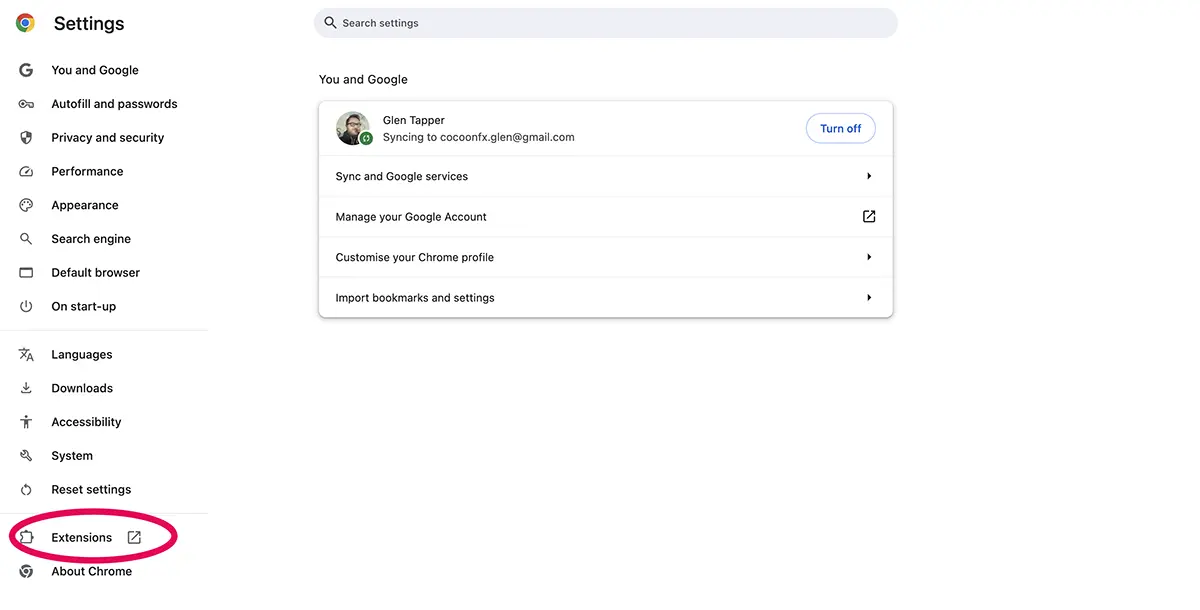
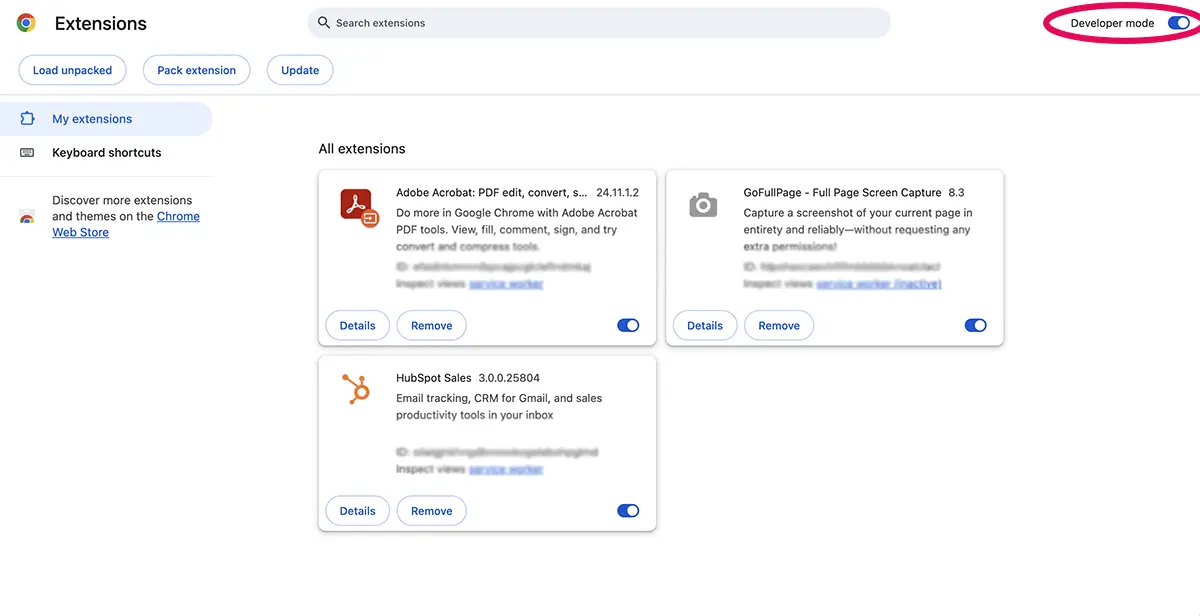
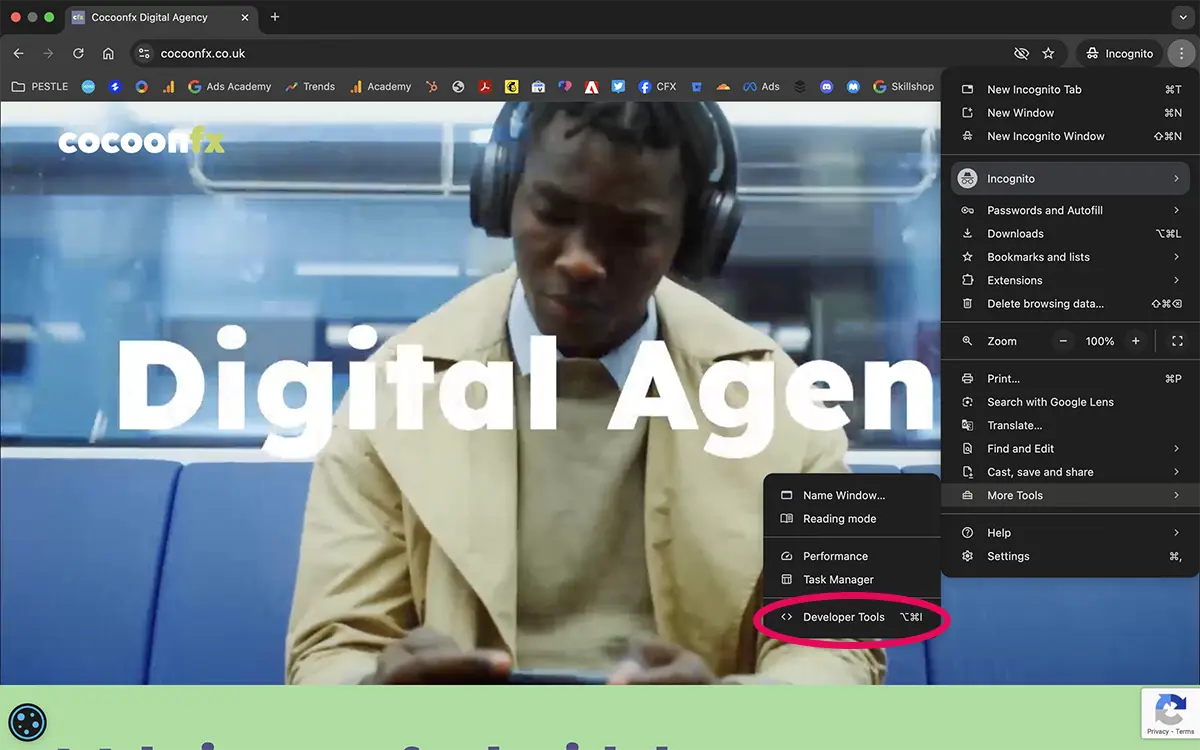
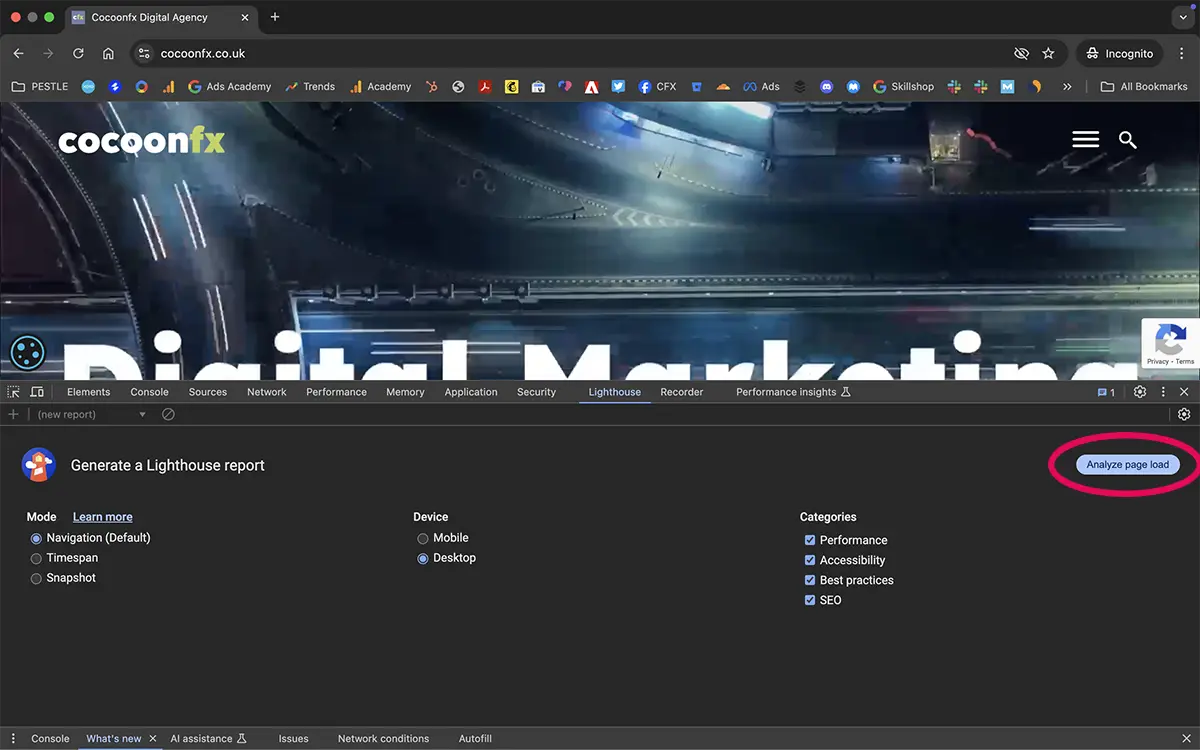
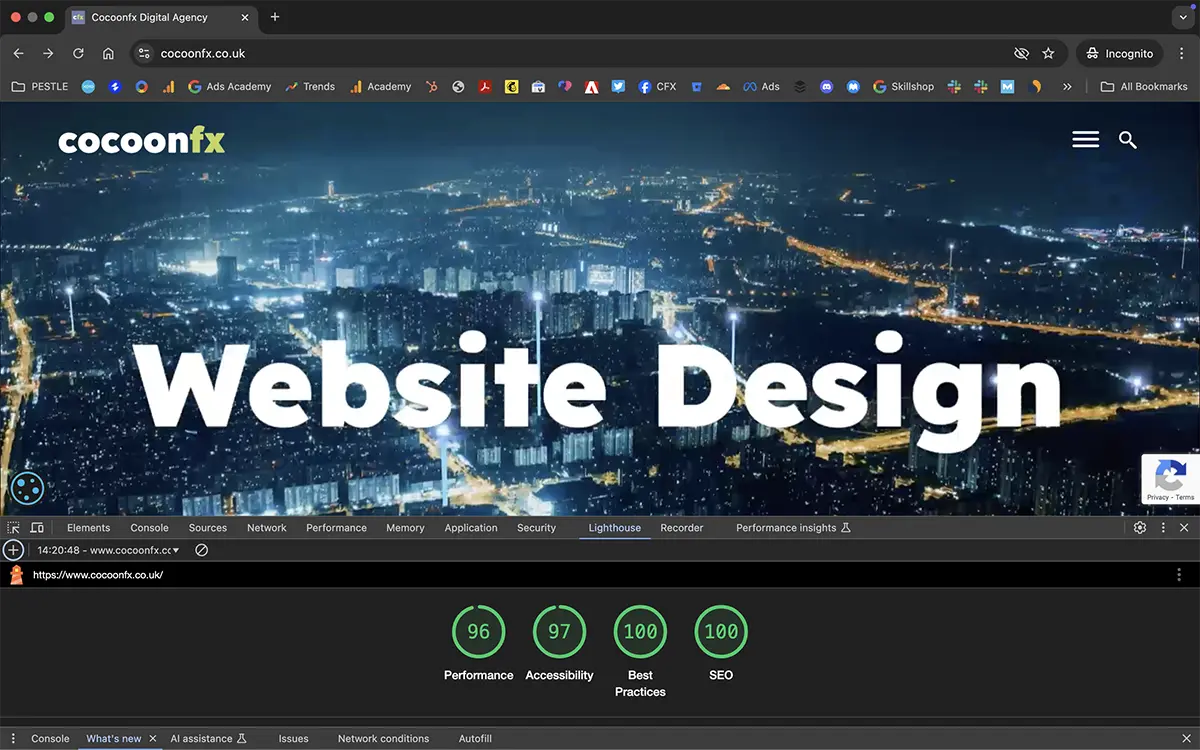
Knowledge is power and Google Lighthouse is an independent 3rd party tool that you can use to help be properly informed about issues related to your site. We’ve used it with clients who have been confused about the conflicting advice they have been given when trying to develop their site for marketing. They can see for themselves if the advice been given matches up.
Give it a go, or if you want to learn more get in touch, we’ll be happy to take you through things.
Graphic design and SEO for Derby restaurant

Graphic Design Posters
Annie’s Burger Shack is an authentic American Shack, located in the historic city of Derby. Annie’s are very active. Always putting different events and nights through the year. This is where we were given the honour of designing some posters for internal promotions of upcoming events. In graphic design wise, we got full reign, although Annie has lots of ideas to incorporate too.
SEO Campaign
A key goal of the campaign was to gain control of online PR pieces about the restaurant. Challenge accepted. First off, on-site work. Getting the site core integrated with standard requirements for an SEO campaign.
Once done, we set about rolling out a brand awareness campaign to saturate search engine results with company-branded keyword searches. They started at the bottom of page 1 with a single listing. The bulk of the campaign was spent developing quality backlinks and optimising Google listings. By the time the campaign had finished, Annie’s Burgers posts occupied the entire first page, with only one listing not directly controlled by the marketing team.
The brand campaign also had other impacts on the Google My Business listings. This is a key area when addressing local search and mobile usage. Visitors to a city using mobile phones on the go utilise Google My Business listings a lot more to access key information. It’s always worth considering boosts to local search campaigns around events that will be bringing extra visitors to your location.
Local SEO & Google My Business
In the map results under Google My Business, we managed to get Annie’s Burgers ranked number one.
They saw an increase in the visibility of Google My Business of over 30,000 image views per month. That’s 3000+ clicks to the website, 380+ phone calls, and 1500 requests for directions to the restaurants.
General organic traffic also increased to the website within the first month by over 1500 new visitors. For obvious reasons we can’t completely claim for ourselves, in the second month, between the marketing team and the SEO campaign, for the first time in the restaurant’s history, Annie’s Burgers had a full restaurant booking.
Overall, the campaign was successful in achieving its goal. Branded search was dominated and positive gains were made in organic search to place Annies Burgers in a position where they wanted to be.
Business Web Design; Where to Start?

It’s seemed so straightforward. That was until your business idea needed transferring to web design.
Whether your website plans are to support a growing business, rescue a declining one or promote a great new project – getting the idea from the workplace to cyberspace is a whole other matter.
Often businesses start immediately by focusing their web design ideas on other site examples, templates or images. But here at Cocoonfxmedia, we’ve seen how jumping straight into graphics web design can cause your marketing objectives to quickly become lost in translation.
So for a truly successful website, web design should start at the very basics – with stakeholder analysis.
Introducing Stakeholder Analysis for Web Design
Knowing your audience is vital when considering what information should be included on your website and how it should look.
After all, your audience is the people that will keep you in business.
But stakeholder analysis isn’t solely about your website audience. It involves those who endorse and use your website internally and externally.
So to properly inform web design, here are some helpful questions for you to consider and then we’ll look at how your answers could influence the final design.
Who are the stakeholders that need to be considered for your web design?
If you’re already involved in the running of a business you should have a good idea of who your stakeholders and customers are (otherwise you may want to do a bit of research).
Stakeholders can include more than just customers, they can be staff members who will be using and updating the site, partners that you are representing and management staff that require the site to deliver business objectives within an agreed budget.
Your customers can also be quite different, so it helps to profile them into groups depending on their demographics (or firmographics) so that you can identify those with similar needs and which groups should be your priority.
Impact on Web Design: Incorporating the priorities of your most important stakeholders when starting web design will ensure you start on the right path and avoid having to make large changes later. So next, you need to identify the stakeholders who hold the most influence on the success of your web design.
How important is each stakeholder to the success of your site?
Stakeholder mapping is a great way to identify who needs to be considered and consulted during the web design phase. This is where we can use a useful tool frequently referred to as Mendelow’s Matrix; simply add each stakeholder group where you feel they sit in the chart depending on their interest and influence.
Every matrix will be different – but once completed you will need to remember that stakeholders in quadrant A will need to be kept satisfied (possibly in a legal sense) and those in quadrant B will be the ones that will influence your site the most; their needs should definitely be included in any plans or design requirements.
Impact on Web Design: Once you’ve identified the stakeholders that matter the most for your web design, their needs can be incorporated at the earliest stages, especially when it comes to budgets and the function of the site.
What are the needs of your stakeholders?
Now we know that we don’t have to worry about pleasing every single stakeholder, we can focus on those with the most influence over the success of your site.
So now it’s time to ask, what does each priority stakeholder need to accomplish from the website? It can help to list 2 or 3 important information needs of each stakeholder; for example:
For your marketing manager:
- The ability to easily update content
- Easy ways to monitor success and customer conversions
For your target market:
- Solutions to questions and concerns easily available
- Secure sites for purchasing
- Easy ways to make contact
- Resources for additional information to support them to make informed decisions
For your partners:
- Approval for use of logo and information
- An appropriate representation of their brand
For legal bodies:
- Meeting agreed on terms and conditions
- No content or actions that could breach UK legislation
Impact on Web Design: Definite requirements can finally be put into the web design, including how the site will be accessed both by customers and those updating the content, and which additional sections and security are required. This is where professional web designers will include the best approach for usability, accessibility and functionality.
How will your website marketing objectives be met?
With the basis of the web design now in place, it’s time to incorporate your business and marketing objectives – in other words, what do you want the site to deliver?
It may be that you wish the site to generate leads, increase sales or just boost awareness of your brand? It may be all of these, but it’s best to focus efforts on just one at the web design stage.
So if the motivation behind your website is to generate sales, the web design will focus on engaging first-time visitors and making the purchase process as simple and efficient as possible
If your objective is to generate leads, the web design will need to focus on having clear incentives and sign-up details available.
Impact on Web Design: when business objectives are set at the start of the web design stage, they can be built upon so that each decision for content, graphics and layout will all lead towards meeting business goals; making your objectives achievable and easily monitored.
Why will stakeholders use your site?
Now we’re getting down to the nitty-gritty of web design; user experience.
This is where your knowledge of customer profiles and preferences come in handy.
It’s important to have a website that resonates with the customer; if it’s informal and fun, it may appeal to the younger generation, but that approach may not work if your customers are serious and professional businesses.
So identify why your customers are there.
Are they looking for prices? Or are they searching for product specifications? Maybe they want to find reviews or answers to unique questions. If you fail to include quality content that your customers seek out, you could lose out to competitors.
Once you’ve determined the content and details to be included on your site, it now needs to be displayed in a way that can be easily viewed and navigated through expert web design structures and visuals – but based on the expectations and preferences of your audience.
Impact of Web Design: Structures used for web designs will vary depending on the audience preferences and purpose of the site. The main elements of web design at this stage are to make it as efficient as possible for users to complete tasks, which in turn meets your business objectives. Therefore, web design elements will include:
- site structure: which will mostly be covered during the stakeholder analysis stage and include the function and layout
- visual design: the colours, graphics, images, screen resolution and device access that meets the preferences of your website user
- site navigation: ensuring it is easy for users to locate and travel through the site without getting ‘lost’ or ‘confused’ by including a menu and predictable options such as search, contact or FAQ.
Setting Strong Foundations for Successful Web Design
The next stages following your stakeholder analysis and agreed content are for the production of wireframes or blueprints that show how your site will be structured.
Due to the intricacies of web design, we can’t exactly include all aspects of it in this blog such as coding, search engine optimisation, widgets and so forth. However, you can be sure that you’re on to a winner if you start the web design phase by considering the needs of your stakeholders and incorporating business objectives.
And remember to test, test and test your website design to ensure it is meeting the needs of your users and stakeholders. One way is to simply ask.
Ask your users/stakeholders what they like, dislike or find difficult about the site and then fix it.
You could also present two different web designs called A/B testing to see which users prefer and then use the more effective version.
Great web design is an evolving process, and will require reviews, alterations and adjustments every so often to keep up with changing customer behaviours and expectations – but if you’ve laid the groundwork with web design stakeholder analysis, you can be sure you’ll always be on the path to success with your business website.
For a free consultation on professional web design and development, contact Cocoonfxmedia or call 0121 8203659.
Multi-lingual website for Sieber logistics.
International site, done internationally. Not going to lie, we had interpreters to help this project along. All done via facetime calls – good documentation laying a clear plan of development was even more so important in a project like this.

Challenges Faced
Sieber recognised the importance of an online platform that not only communicated effectively across multiple languages but also offered advanced functionality to enhance user experience. The challenges were manifold: integrating multilingual support seamlessly, providing dynamic course listings, creating fully editable banners for customized messaging, and incorporating advanced map functionality to facilitate logistics tracking.
Final Result
Sieber’s journey to redesign its online presence exemplifies its dedication to innovation, customer satisfaction, and environmental responsibility. Sieber has set a new standard for excellence in the logistics industry. The result is a dynamic and user-friendly website that not only meets but exceeds the expectations of its clientele, positioning Sieber as a leader in logistics in the digital era.

Benefits Realised:
The implementation of a multi-functional multilingual website yielded significant benefits for Sieber:
1. Enhanced User Experience:
Visitors enjoyed a seamless and intuitive browsing experience, thanks to the seamless integration of multiple plugins and advanced functionality.
2. Improved Communication:
Multilingual support allowed Sieber to communicate effectively with its diverse clientele, fostering better engagement and understanding.
3. Dynamic Content Management:
Fully editable banners empowered Sieber to convey timely and relevant messages, keeping visitors informed and engaged.
4. Advanced map functionality:
Allowing easy management of listing multiple company locations whilst using full Google Maps functionality.
5. Environmental Responsibility:
Sieber’s commitment to carbon-neutral hosting services further solidified its reputation as a socially and environmentally responsible organisation.